简介
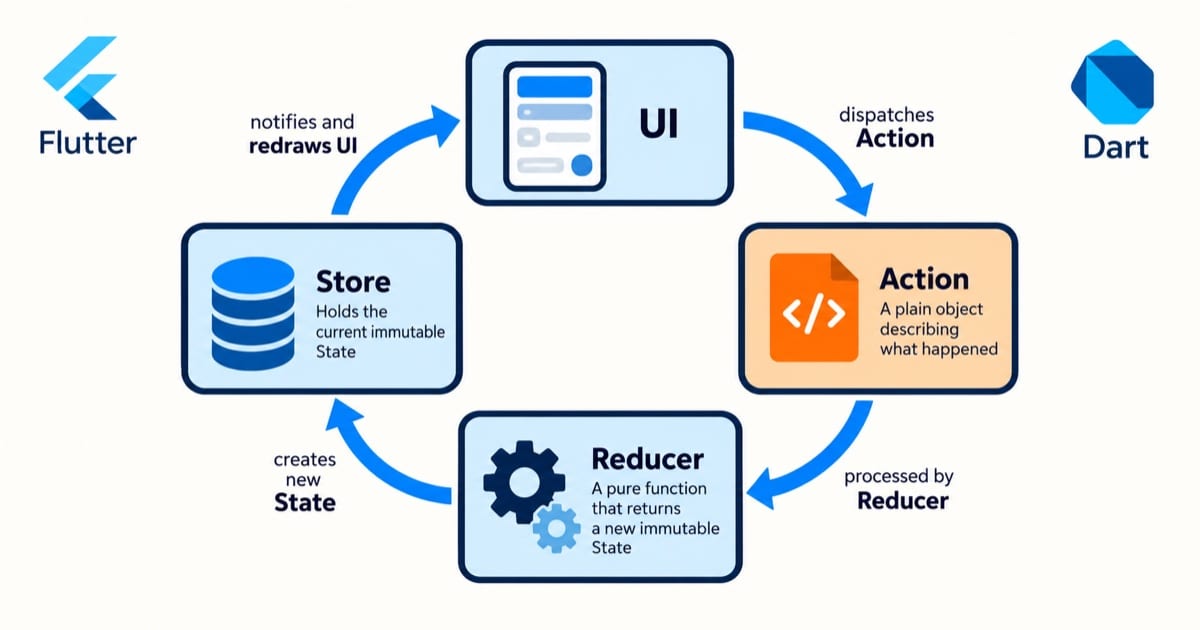
Redux 是一个可预测的状态容器,它基于单向数据流的原则,通过 Action、Reducer 和 Store 来管理应用状态。Flutter Redux 是 Redux 在 Flutter 中的实现。
基本概念
State
// 应用状态
class AppState {
  final int counter;
  final bool isLoading;

  AppState({
    this.counter = 0,
    this.isLoading = false,
  });

  AppState copyWith({
    int? counter,
    bool? isLoading,
  }) {
    return AppState(
      counter: counter ?? this.counter,
      isLoading: isLoading ?? this.isLoading,
    );
  }
}
Action
// 定义操作
class IncrementAction {}
class DecrementAction {}
class LoadDataAction {}
class LoadDataSuccessAction {}
class LoadDataFailureAction {
  final String error;
  LoadDataFailureAction(this.error);
}
Reducer
// 状态更新逻辑
AppState appReducer(AppState state, dynamic action) {
  if (action is IncrementAction) {
    return state.copyWith(counter: state.counter + 1);
  }

  if (action is DecrementAction) {
    return state.copyWith(counter: state.counter - 1);
  }

  if (action is LoadDataAction) {
    return state.copyWith(isLoading: true);
  }

  if (action is LoadDataSuccessAction) {
    return state.copyWith(isLoading: false);
  }

  return state;
}
基本用法
创建 Store
void main() {
  final store = Store<AppState>(
    appReducer,
    initialState: AppState(),
    middleware: [thunkMiddleware],
  );

  runApp(
    StoreProvider(
      store: store,
      child: MyApp(),
    ),
  );
}
使用 Store
// 读取状态
StoreConnector<AppState, int>(
  converter: (store) => store.state.counter,
  builder: (context, counter) {
    return Text('Counter: $counter');
  },
);

// 发送 Action
StoreProvider.of<AppState>(context).dispatch(IncrementAction());
完整示例
// 用户状态
class UserState {
  final User? user;
  final bool isLoading;
  final String? error;

  UserState({
    this.user,
    this.isLoading = false,
    this.error,
  });

  UserState copyWith({
    User? user,
    bool? isLoading,
    String? error,
  }) {
    return UserState(
      user: user ?? this.user,
      isLoading: isLoading ?? this.isLoading,
      error: error ?? this.error,
    );
  }
}

// 用户操作
class LoadUserAction {}
class LoadUserSuccessAction {
  final User user;
  LoadUserSuccessAction(this.user);
}
class LoadUserFailureAction {
  final String error;
  LoadUserFailureAction(this.error);
}
class UpdateUserAction {
  final String name;
  final int age;
  UpdateUserAction({required this.name, required this.age});
}

// 用户 Reducer
UserState userReducer(UserState state, dynamic action) {
  if (action is LoadUserAction) {
    return state.copyWith(isLoading: true, error: null);
  }

  if (action is LoadUserSuccessAction) {
    return state.copyWith(
      user: action.user,
      isLoading: false,
    );
  }

  if (action is LoadUserFailureAction) {
    return state.copyWith(
      error: action.error,
      isLoading: false,
    );
  }

  if (action is UpdateUserAction) {
    final updatedUser = state.user?.copyWith(
      name: action.name,
      age: action.age,
    );
    return state.copyWith(user: updatedUser);
  }

  return state;
}

// 异步 Action Creator
ThunkAction<UserState> loadUser() {
  return (Store<UserState> store) async {
    store.dispatch(LoadUserAction());

    try {
      final user = await UserRepository().fetchUser();
      store.dispatch(LoadUserSuccessAction(user));
    } catch (e) {
      store.dispatch(LoadUserFailureAction(e.toString()));
    }
  };
}

// 页面组件
class UserPage extends StatelessWidget {
  @override
  Widget build(BuildContext context) {
    return Scaffold(
      appBar: AppBar(title: Text('Redux Demo')),
      body: StoreConnector<UserState, UserViewModel>(
        converter: (store) => UserViewModel(
          user: store.state.user,
          isLoading: store.state.isLoading,
          error: store.state.error,
          onLoadUser: () => store.dispatch(loadUser()),
          onUpdateUser: (name, age) => store.dispatch(
            UpdateUserAction(name: name, age: age),
          ),
        ),
        builder: (context, vm) {
          if (vm.isLoading) {
            return Center(child: CircularProgressIndicator());
          }

          if (vm.error != null) {
            return Center(child: Text('Error: ${vm.error}'));
          }

          if (vm.user == null) {
            return Center(
              child: ElevatedButton(
                onPressed: vm.onLoadUser,
                child: Text('Load User'),
              ),
            );
          }

          return Center(
            child: Column(
              mainAxisAlignment: MainAxisAlignment.center,
              children: [
                Text(
                  'Name: ${vm.user!.name}',
                  style: TextStyle(fontSize: 24),
                ),
                Text(
                  'Age: ${vm.user!.age}',
                  style: TextStyle(fontSize: 24),
                ),
                ElevatedButton(
                  onPressed: () => vm.onUpdateUser('John Doe', 30),
                  child: Text('Update User'),
                ),
              ],
            ),
          );
        },
      ),
    );
  }
}
高级用法
中间件
Middleware<AppState> loggingMiddleware = (
  Store<AppState> store,
  dynamic action,
  NextDispatcher next,
) {
  print('Action: $action');
  next(action);
  print('State: ${store.state}');
};
选择器
class Selectors {
  static User? getUser(UserState state) => state.user;
  static bool isLoading(UserState state) => state.isLoading;
  static String? getError(UserState state) => state.error;
}
组合 Reducer
AppState appReducer(AppState state, dynamic action) {
  return AppState(
    user: userReducer(state.user, action),
    settings: settingsReducer(state.settings, action),
  );
}
最佳实践
- Reducer 必须是纯函数:同样输入同样输出,不调网络、不读时间、不改传入的 state(返回新对象)。反例:在 Reducer 里
http.get再 emit——devtools 的 time-travel 会回放 reducer,每回放一次就发一次请求 - 异步走 middleware(redux_thunk / redux_epic):Action 只描述”发生了什么”,副作用全在 middleware 里做,reducer 只管”状态怎么变”
- state 做范式化:别嵌三层
user.orders[0].items,用Map<id, Order>扁平存;更新一条订单不用深拷贝整棵树 - Action 类名说人话:
AddToCart比UpdateState好;payload 字段显式声明,别塞个 dynamic data 万能包——三个月后你自己都看不懂
注意事项
- 高频 ephemeral 状态别进全局 store:表单输入中这种每敲一个键就变的状态也塞 store,每次按键全量走一遍 middleware+reducer;用局部 setState,提交时再 dispatch
- 别在 Reducer 里深拷贝整棵树:state 越大每次 dispatch 越慢;大列表分页存,reducer 里只拼 id 列表
- StoreBuilder 别包整页:整页一个 StoreBuilder 监听整个 state,任何 action 都 rebuild;拆小 StoreConnector,或开
distinct: true - 选型提醒:状态只是”列表+表单+用户信息”就别上 Redux——样板代码量在 Flutter 里比前端还劝退,架构是为复杂度服务的(实战案例的结论)
实战案例
Redux(flutter_redux)在我的项目里出场率为零。原因:它是为”超复杂全局状态”设计的(想想前端 Redux 的 store+reducer+middleware 全家桶),而我的 App(电商、货运、旅行)状态无非是”列表数据+表单+用户信息”,GetX 的响应式变量完全够用。Redux 的样板代码量在 Flutter 里比在前端还劝退——每个 action 要写类,每个 reducer 要写 switch。我看过一个用 flutter_redux 的开源项目,状态管理代码占了三分之一行数,维护者自己都说”早知道用 GetX”。架构是为复杂度服务的,没有那个复杂度就别请那尊佛。
总结
Redux 提供了一种可预测的状态管理方案,通过严格的单向数据流和不可变状态,可以构建出更易维护的应用程序。理解并掌握 Redux 的使用对于开发大型 Flutter 应用很有帮助。