简介
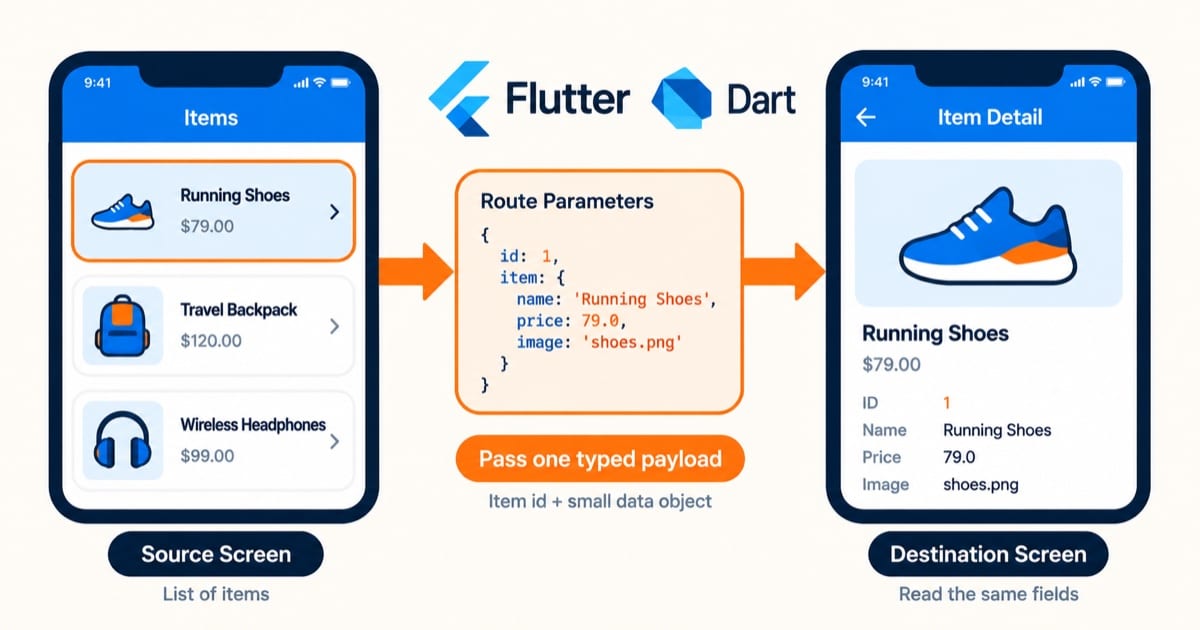
在页面导航时,经常需要传递参数。Flutter 提供了多种参数传递方式,本文详细介绍这些方法。
基本参数传递
构造函数传参
// 定义页面
class DetailPage extends StatelessWidget {
  final String id;
  final String title;

  const DetailPage({
    Key? key,
    required this.id,
    required this.title,
  }) : super(key: key);

  @override
  Widget build(BuildContext context) {
    return Scaffold(
      appBar: AppBar(title: Text(title)),
      body: Center(child: Text('ID: $id')),
    );
  }
}

// 导航并传参
Navigator.push(
  context,
  MaterialPageRoute(
    builder: (context) => DetailPage(
      id: '123',
      title: 'Product Detail',
    ),
  ),
);
命名路由参数
// 注册路由
MaterialApp(
  onGenerateRoute: (settings) {
    if (settings.name == '/detail') {
      final args = settings.arguments as Map<String, dynamic>;
      return MaterialPageRoute(
        builder: (context) => DetailPage(
          id: args['id'],
          title: args['title'],
        ),
      );
    }
    return null;
  },
);

// 导航并传参
Navigator.pushNamed(
  context,
  '/detail',
  arguments: {
    'id': '123',
    'title': 'Product Detail',
  },
);
类型安全的参数传递
使用泛型
class TypedPageRoute<T> extends MaterialPageRoute<T> {
  TypedPageRoute({
    required WidgetBuilder builder,
    required this.arguments,
  }) : super(builder: builder);

  final T arguments;
}

// 使用示例
class DetailArguments {
  final String id;
  final String title;

  DetailArguments({
    required this.id,
    required this.title,
  });
}

Navigator.push(
  context,
  TypedPageRoute<DetailArguments>(
    builder: (context) => DetailPage(),
    arguments: DetailArguments(
      id: '123',
      title: 'Product Detail',
    ),
  ),
);
完整示例
// 参数模型
class ProductArguments {
  final String id;
  final String title;
  final double price;
  final String imageUrl;

  const ProductArguments({
    required this.id,
    required this.title,
    required this.price,
    required this.imageUrl,
  });

  // 从 Map 创建实例
  factory ProductArguments.fromMap(Map<String, dynamic> map) {
    return ProductArguments(
      id: map['id'] as String,
      title: map['title'] as String,
      price: map['price'] as double,
      imageUrl: map['imageUrl'] as String,
    );
  }

  // 转换为 Map
  Map<String, dynamic> toMap() {
    return {
      'id': id,
      'title': title,
      'price': price,
      'imageUrl': imageUrl,
    };
  }
}

// 产品详情页
class ProductDetailPage extends StatelessWidget {
  final ProductArguments args;

  const ProductDetailPage({
    Key? key,
    required this.args,
  }) : super(key: key);

  @override
  Widget build(BuildContext context) {
    return Scaffold(
      appBar: AppBar(title: Text(args.title)),
      body: Column(
        crossAxisAlignment: CrossAxisAlignment.start,
        children: [
          Image.network(
            args.imageUrl,
            width: double.infinity,
            height: 200,
            fit: BoxFit.cover,
          ),
          Padding(
            padding: EdgeInsets.all(16),
            child: Column(
              crossAxisAlignment: CrossAxisAlignment.start,
              children: [
                Text(
                  args.title,
                  style: Theme.of(context).textTheme.headline6,
                ),
                SizedBox(height: 8),
                Text(
                  'Price: \$${args.price.toStringAsFixed(2)}',
                  style: Theme.of(context).textTheme.subtitle1,
                ),
                SizedBox(height: 8),
                Text('Product ID: ${args.id}'),
              ],
            ),
          ),
        ],
      ),
    );
  }
}

// 路由配置
class AppRouter {
  static Route<dynamic> onGenerateRoute(RouteSettings settings) {
    switch (settings.name) {
      case '/product-detail':
        final args = settings.arguments as Map<String, dynamic>;
        final productArgs = ProductArguments.fromMap(args);
        return MaterialPageRoute(
          builder: (_) => ProductDetailPage(args: productArgs),
        );
      default:
        return MaterialPageRoute(
          builder: (_) => NotFoundPage(),
        );
    }
  }
}

// 使用示例
class ProductListPage extends StatelessWidget {
  @override
  Widget build(BuildContext context) {
    return Scaffold(
      appBar: AppBar(title: Text('Products')),
      body: ListView.builder(
        itemCount: 10,
        itemBuilder: (context, index) {
          return ListTile(
            title: Text('Product $index'),
            onTap: () {
              Navigator.pushNamed(
                context,
                '/product-detail',
                arguments: {
                  'id': 'PROD_$index',
                  'title': 'Product $index',
                  'price': 9.99 + index,
                  'imageUrl': 'https://picsum.photos/200?$index',
                },
              );
            },
          );
        },
      ),
    );
  }
}
最佳实践
- 必传参数走构造器:
DetailPage({required this.id})——类型安全、IDE 可跳转、编译期检查,这是首选 - Get.arguments 只做”可选附加信息”:它是 dynamic,取出来必须判空+转类型(实战案例里
as String在 null 上炸的坑) - 深链接/query 参数用 Get.parameters:
/detail?id=123这种,用Get.parameters['id']取,别手写字符串 split - 需要序列化的参数(分享链接、通知跳转)实现 toJson/fromJson:query 只能传字符串,对象先序列化再拼
注意事项
- 别传大对象:列表页别把整个 item 传给详情页,传 id,详情页自己查缓存/调接口——大对象走路由参数,内存里多份拷贝
- 别传敏感信息:token、密码别放路由参数(Get.parameters 会进 URL,深链接可被系统日志记录)
- 参数为 null 要有兜底:详情页 id 为 null 时显示”参数错误”页,别直接
id!炸掉 - 跨页面共享的”状态”别用参数传递:用状态管理(GetX controller/Provider);参数是一次性的,状态是持续的——混用会导致返回上一页数据不同步
实战案例
GetX 项目里我传参主要用两种。简单场景直接构造器传:Get.to(() => const CustomServicePage()),参数在构造时就定了,类型安全,IDE 能检查。需要跨页面共享的(比如从列表进详情要带 id),我用 Get.toNamed(RouteNames.cargoDetail, arguments: {'id': id}),目标页用 Get.arguments 取。但有个坑:Get.arguments 是 dynamic,取出来一定要判空+转类型,我吃过 arguments['id'] as String 在 null 上炸的亏。现在我的习惯是:页面间传参优先构造器,arguments 只做”可选的附加信息”,并且取的时候写防御代码。类型安全这事,编译器能帮你的,别推给运行时。
总结
合理的参数传递机制可以让页面之间的数据交互更加清晰和安全。通过使用类型安全的参数模型和良好的错误处理,可以提高应用的稳定性和可维护性。